|
|
NEHermes 插件实测:ponytail —— 让 AI 少写一半代码
命令、输出和截图均来自 macOS 上的 NEHermes 桌面端 v0.21.14 实测。
一、这个插件解决什么问题
让 AI 写并发抓取 URL 状态码的脚本,它却可能堆上自定义异常、argparse、结果字典、线程配置和分层退出码:上百行代码,本可三十行完成。
ponytail 要模型像“懒惰的资深工程师”那样工作:不是马虎,而是按顺序找到第一个可行方案就停:
- 真需要吗?(YAGNI:说不清用途就不做)
- 代码库已有?复用
- 标准库能干?用标准库
- 平台能做?用原生控件,如 input date
- 已有依赖能做?直接用,不加新依赖
- 一行能解决?就写一行
- 都不行,再写最少的代码
但输入校验、防数据丢失的错误处理、安全、无障碍基础及用户明确要求的内容,不能简化。
- 仓库:DietrichGebert/ponytail(MIT)
- 规模:147k star / 7.9k fork,最新版 v4.10.0(2026-09-14)
- NEHermes 原生插件:1 个每轮注入规则的 pre_llm_call 钩子、6 个命令、6 个随包技能
二、在 NEHermes 里安装
1. 打开内置终端
右上角「布局编辑器」→ 预设「终端组」,下方出现终端;可上拖分隔条(图 01)。
2. 先让终端找得到 hermes
内置终端的 PATH 缺少 hermes 的 bin 目录;先补上(仅当前窗口有效):
- export PATH="$(ls -d $HOME/.nehermes/runtime/versions/*/python/venv/bin | head -1):$PATH"
3. 安装
- hermes plugins install DietrichGebert/ponytail --enable
安全扫描可能拦截安装(图 02):

- Blocked: Security scan blocked plugin install: Blocked (dangerous verdict, 97 findings).
- --force does not override a dangerous verdict.
- Scan: plugin (DietrichGebert/ponytail/community) Verdict: DANGEROUS
97 条命中的典型来源:
- CRITICAL 路径穿越:benchmarks/agentic/README.md:52 的测试用例 ../../etc/pa…
- MEDIUM 供应链:README 和 examples/*.md 中的 git clone、npm/pip install 示例
- MEDIUM 执行:基准脚本 run.py 的 subprocess.run/Popen
- LOW 持久化/混淆:README 的 AGENTS.md 加载说明
命中多来自文档、示例和测试,不是 hooks/ 下的运行时代码;--force 也无法绕过此裁决。
仅在确认信任上游后临时关闭扫描,装完立即恢复:
- hermes config set plugins.scan_on_install false
- hermes plugins install DietrichGebert/ponytail --enable
- hermes config set plugins.scan_on_install true
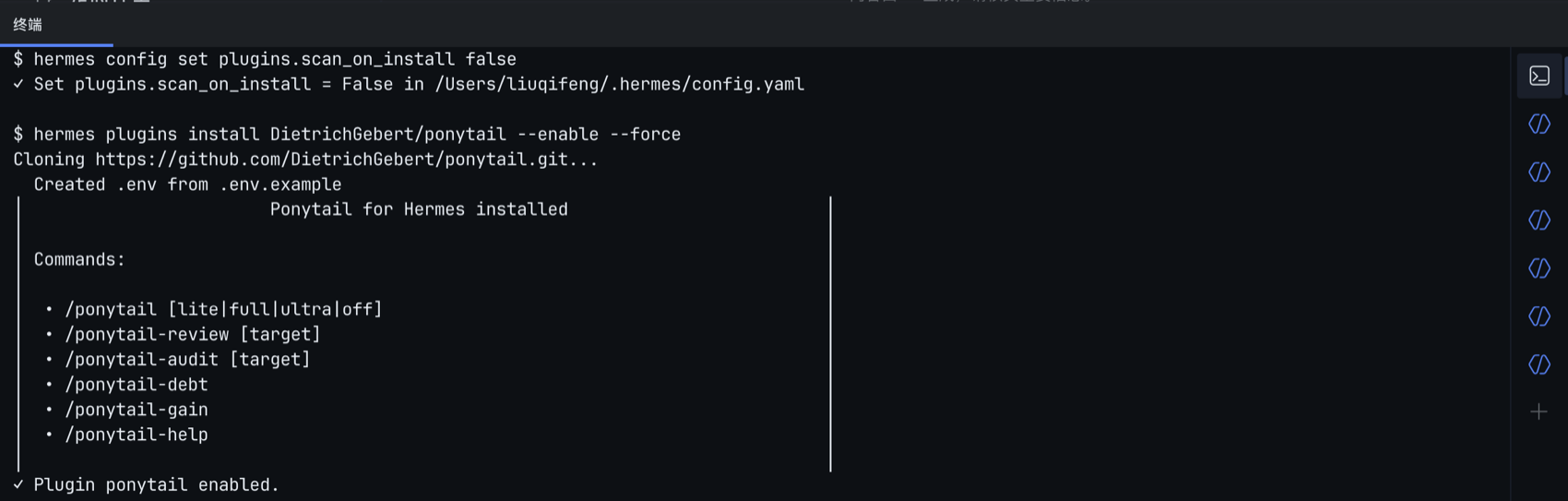
安装成功会列出 6 个命令和技能(图 03)。启用后需重启 gateway;桌面端也可重启 App。
4. 验证
- hermes plugins list --plain --no-bundled
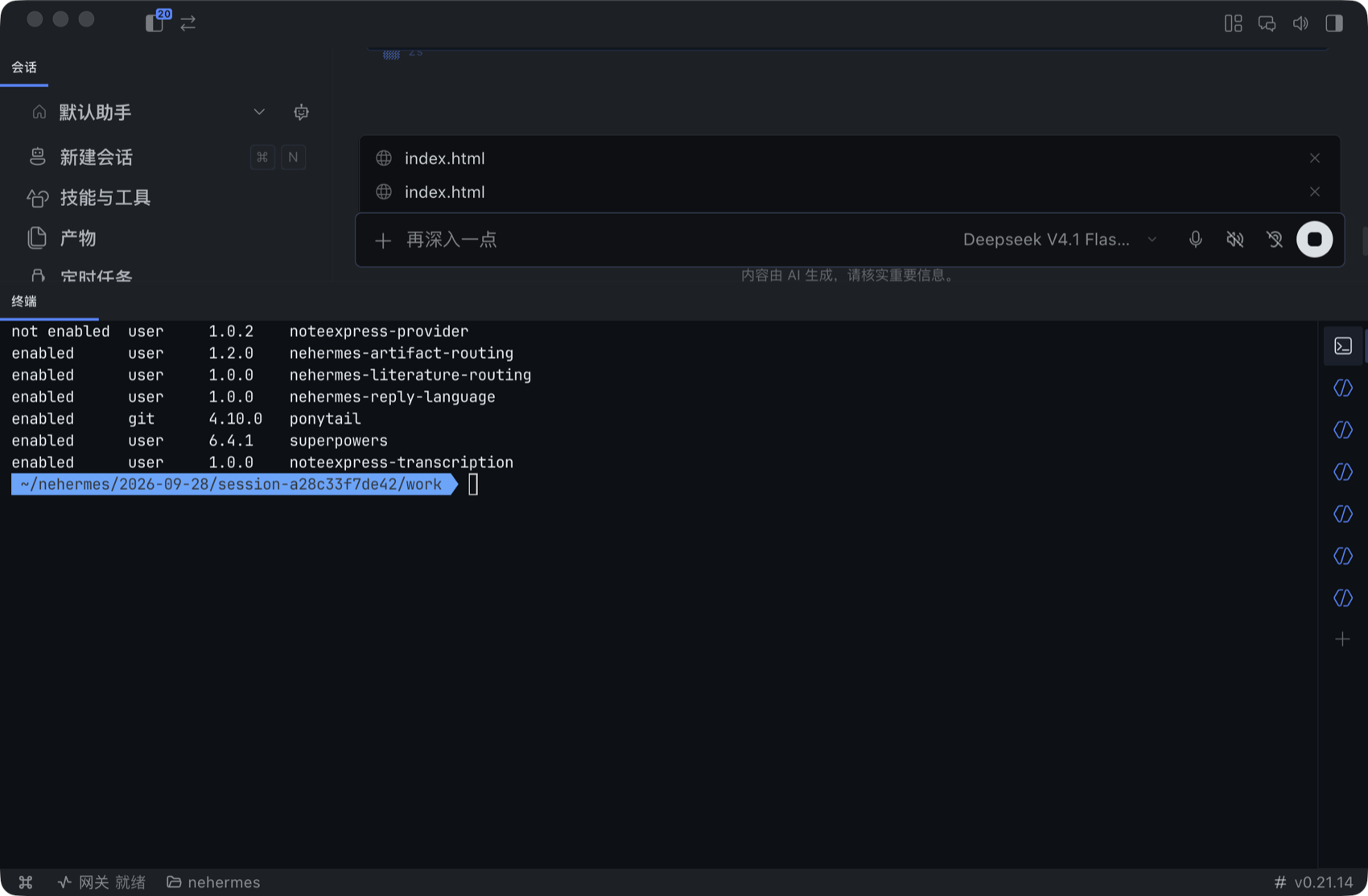
确认出现此行(图 04):
enabled git 4.10.0 ponytail

5. 装在哪里
~/.hermes/plugins/ponytail/(含 plugin.yaml、hooks/、commands/、skills/)。
「技能与工具」页不显示插件技能;6 个技能在 Agent 侧以 ponytail: 命名空间加载,不代表安装失败。
三、使用方式
重启后默认 full 档。pre_llm_call 每轮注入规则,无需在提示词里重复要求。
会话内切换档位:
- /ponytail lite # 照办并提示更简方案
- /ponytail full # 默认:七级阶梯
- /ponytail ultra # 先质疑需求再动手
- /ponytail off # 关闭
也可说「stop ponytail」或「normal mode」关闭。
六个命令:
- /ponytail lite / full / ultra / off —— 切换档位
- /ponytail-review —— 审过度设计,逐行建议精简
- /ponytail-audit —— 全仓库审查
- /ponytail-debt —— 汇总 ponytail: 债务注释
- /ponytail-gain —— 查看作者基准
- /ponytail-help —— 速查表
全局档位:环境变量 PONYTAIL_DEFAULT_MODE=off|lite|full|ultra,或 ~/.config/ponytail/config.json 的 defaultMode;优先级:环境变量 → 配置 → full。
工程习惯:用 # ponytail: 全局锁,吞吐量重要时再换按账号锁 等注释记录取舍、上限与补救时机;/ponytail-debt 可汇总。
四、实测
环境:macOS、NEHermes 桌面端 v0.21.14、runtime 0.21.0-r5、deepseek-v4.1-flash(noteexpress)。
两组相同的提示词:
- 写一个 Python 脚本:从命令行接收若干 URL,并发抓取它们的 HTTP 状态码并打印结果。只用标准库。只输出完整代码,不要解释。
对照脚本:off/full 各跑 3 次,统计代码非空行数与回复大小:
- #!/usr/bin/env bash
- set -u
- D=$(cd "$(dirname "$0")" && pwd)
- H=$(ls -d "$HOME"/.nehermes/runtime/versions/*/python/venv/bin/hermes | head -1)
- P=$(cat "$D/prompt.txt")
- for mode in off full; do
- for i in 1 2 3; do
- f="$D/demo-$mode-$i.md"
- PONYTAIL_DEFAULT_MODE=$mode "$H" -z "$P" >"$f" 2>/dev/null
- lines=$(awk '/^```/{f=!f; next} f&&NF{n++} END{print n+0}' "$f")
- [ "$lines" -eq 0 ] && lines=$(grep -c '[^[:space:]]' "$f")
- printf '%-5s run%s 代码 %3s 行 %5s 字符\n' "$mode" "$i" "$lines" "$(wc -c <"$f" | tr -d ' ')"
- done
- done
结果(图 05):
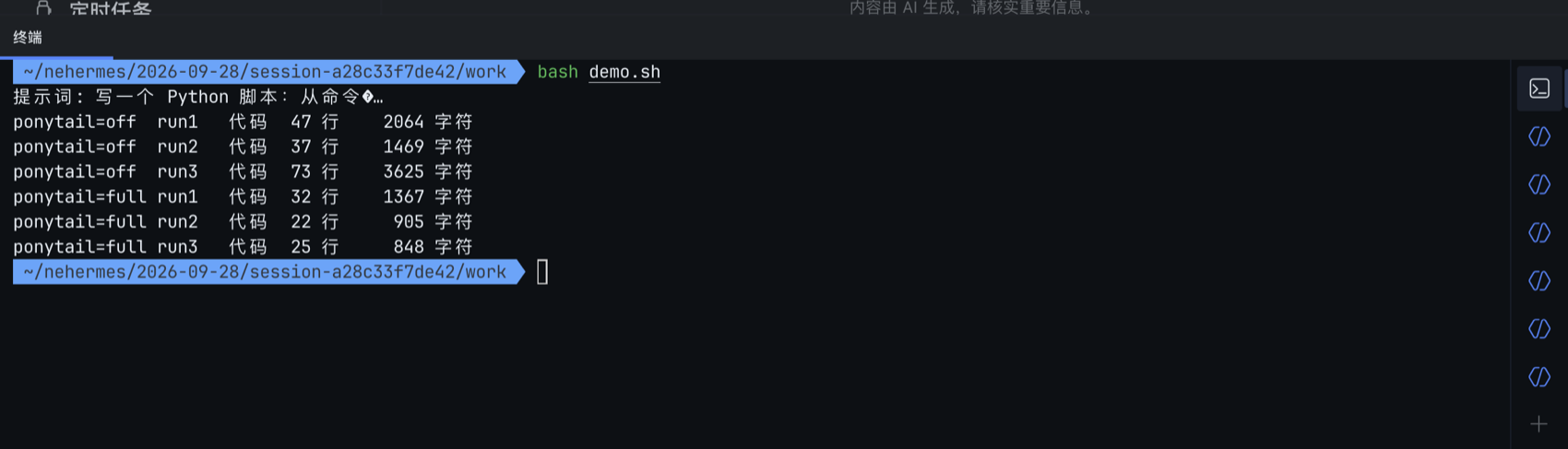
- ponytail=off 代码 47 / 37 / 73 行,中位数 47 字符 2064 / 1469 / 3625,中位数 2064
- ponytail=full 代码 32 / 22 / 25 行,中位数 25 字符 1367 / 905 / 848,中位数 905
中位数:47 → 25 行(-47%),2064 → 905 字符(-56%)。
原始输出节选:
ponytail=off,47 行:类型注解、常量、docstring、noqa、分层退出码:
- TIMEOUT = 10
- UA = "Mozilla/5.0 (compatible; status-fetcher/1.0)"
- def fetch_status(url: str, timeout: float = TIMEOUT) -> str:
- """返回状态码字符串;失败时返回 'ERR: <原因>'。"""
- req = urllib.request.Request(url, method="GET", headers={"User-Agent": UA})
- try:
- with urllib.request.urlopen(req, timeout=timeout) as resp:
- return str(resp.status)
- except urllib.error.HTTPError as e:
- return str(e.code)
- except urllib.error.URLError as e:
- return f"ERR: {e.reason}"
- except Exception as e: # noqa: BLE001
- return f"ERR: {type(e).__name__}: {e}"
- def main(argv=None) -> int: # 还没结束,后面还有 argparse 和打印逻辑
ponytail=full,22 行:直接读 sys.argv,用 ex.map 并发:
- def status(url):
- try:
- with urlopen(Request(url, headers={"User-Agent": "status-check/1.0"}), timeout=10) as r:
- return url, r.status
- except HTTPError as e:
- return url, e.code
- except URLError as e:
- return url, "error: %s" % e.reason
- def main(urls):
- if not urls:
- sys.exit("usage: %s URL [URL ...]" % sys.argv[0])
- with ThreadPoolExecutor(max_workers=min(32, len(urls))) as ex:
- for url, code in ex.map(status, urls):
- print("%s -> %s" % (url, code))
- 单机单模型、每组 3 次,有方差(off 曾有 73 行);只能说明趋势。
- 两版均处理连接失败与 HTTP 错误;差别在参数解析、类型和抽象:砍外围,不砍底线。
作者基准(/ponytail-gain,5 项任务,Haiku/Sonnet/Opus):代码 6–20%,成本 23–53%,速度快 3–6 倍;属上游自测中位数,非本机数据。
五、坑与注意
- 安装被 Blocked (dangerous verdict, 97 findings) 拦下
原因:文档/测试中的 pip install、../../etc/passwd、subprocess 被误判。
处理:信任上游后临时关扫描,装完恢复(见上文命令)。 - Error: Git clone timed out after 60 seconds.
原因:GitHub 网络不稳,clone 超时 60 秒。
处理:重试(本次各重试 1 次)。 - 内置终端里 hermes: command not found
原因:PATH 缺少 runtime/bin。
处理:执行第 2 步的 export PATH。 - 装完在「技能与工具」页找不到 ponytail
原因:该页不展示插件技能。
处理:用 hermes plugins list 验证;Agent 侧可用 ponytail: 技能。 - 启用后没反应
原因:需重启 gateway 或 App。
处理:hermes gateway restart 或重启 App。 - hermes config set 之后 config.yaml 的注释没了
原因:命令会重写配置文件。
处理:先 cp ~/.hermes/config.yaml ~/.hermes/config.yaml.bak。
六、小结
一句话:它不只省代码,更让人先问:这段代码到底要不要写。
|
|



 发表于 2026-9-30 13:09:07