找回密码
 立即注册

用户中心登录

通过NE账号安全登录

搜索
热搜: NE3 NE 3 已解决
查看: 113|回复: 0

让 AI 一眼看懂整个代码库:graphify 在 NEHermes 里的安装与实测

[复制链接]

3

主题

11

回帖

101

积分

注册会员

积分
101
发表于 2026-9-24 20:12:14 | 显示全部楼层 |阅读模式
让 AI 一眼看懂整个代码库:graphify 在 NEHermes 里的安装与实测

项目地址:https://github.com/Graphify-Labs/graphify
环境:NEHermes v0.21.14 · macOS · graphify 0.9.67

一句话:graphify 把任意代码库一次性转成可查询的知识图谱——节点是函数、类和文件,边是调用与依赖;再附一张可交互的 HTML 图和一份 Markdown 报告。装进 NEHermes 后,你只要说一句「帮我把这个项目建成知识图谱」,Agent 会自己去跑。

一、它解决什么问题

  • 接手陌生项目:不用逐个文件翻,先看谁最核心、谁依赖谁。
  • 改动前评估影响:graphify explain "函数名" 直接列出它的邻居。
  • 大仓库对话:图谱是压缩后的结构索引,比把源码整段塞进上下文便宜得多。


二、安装方法(两条命令)

在系统终端(Terminal / iTerm)里执行:

  1. uv tool install graphifyy
  2. graphify install --platform hermes
复制代码


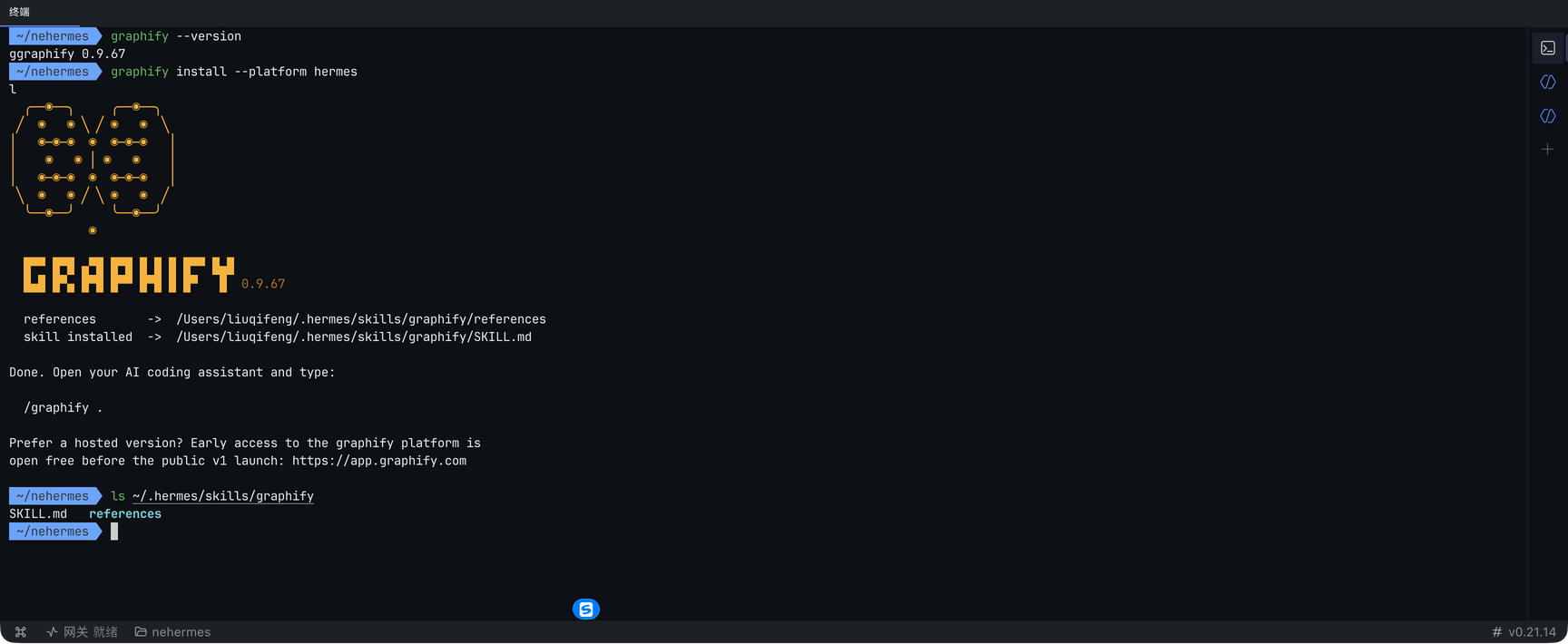
第一条安装 CLI,可执行文件落在 ~/.local/bin/graphify;第二条把技能写进 Hermes 的技能目录 ~/.hermes/skills/graphify/。

执行过程与结果(App 内置终端):

01-install-terminal.png

装完到 App 里确认一次:左侧「技能与工具」→ 搜索框输入 graphify → 列表里开关为开启状态,右侧就是这份技能的说明。

02-skills-enabled.png

两个真实的坑(请注意):

  • App 内置终端里没有 uv 和 hermes 这两个命令(会报 zsh: command not found)。所以上面两条请放在系统终端里做;App 终端里只用得到已经装好的 graphify。
  • graphify install 结束时它会提示 Done. Open your AI coding assistant and type: /graphify . —— 那是 Claude Code 的斜杠命令写法,Hermes 里不需要也不存在,直接用自然语言即可(见下一节)。


三、使用方式

方式 A:命令行三步走(最可控)

  1. graphify extract <源码目录> --code-only --out ./out
  2. cd out && graphify cluster-only . --no-label --no-viz
  3. graphify export html
复制代码


  • --code-only:只扫代码,不扫文档。
  • --no-label:跳过用 LLM 给社区自动命名(省钱、离线可用)。
  • --no-viz:跳过 HTML 生成(图很大或放在 CI 里时很有用)。


产物统一在 graphify-out/ 下:graph.json(图谱本体)、GRAPH_REPORT.md(可读报告)、graph.html(交互式图谱)。

方式 B:让 Agent 自己用(最省事)

技能装好后,直接在 NEHermes 对话里说:

用 graphify 把 ~/myproject 建成知识图谱,然后告诉我哪几个模块最核心。

Agent 会自己跑完整条流水线,并把结果讲给你听——这才是把它装进 NEHermes 的意义。

方式 C:常用子命令速查

  1. graphify query "问题" --budget 300   # 自然语言查询,返回相关节点与边
  2. graphify explain "函数名"            # 某节点的邻居与通俗解释
  3. graphify path "A" "B"               # 两个节点间的最短路径
  4. graphify god-nodes --top 8           # 连接度最高的核心节点
  5. graphify update <目录>               # 代码变更后增量重建(不需要 LLM)
  6. graphify watch <目录>                # 监听目录,一改动就重建
复制代码


四、测试实例:拿 NEHermes 自己的源码建图

语料就选 NEHermes 运行时里的 python/agent 目录(210 个 .py),你可以在自己机器上原样复现:

  1. mkdir -p ~/graphify-demo && cd ~/graphify-demo
  2. SRC=$(ls -d ~/.nehermes/runtime/versions/*/python/agent)
  3. graphify extract "$SRC" --code-only --out ./nehermes-agent
  4. cd nehermes-agent && graphify god-nodes --top 8
复制代码


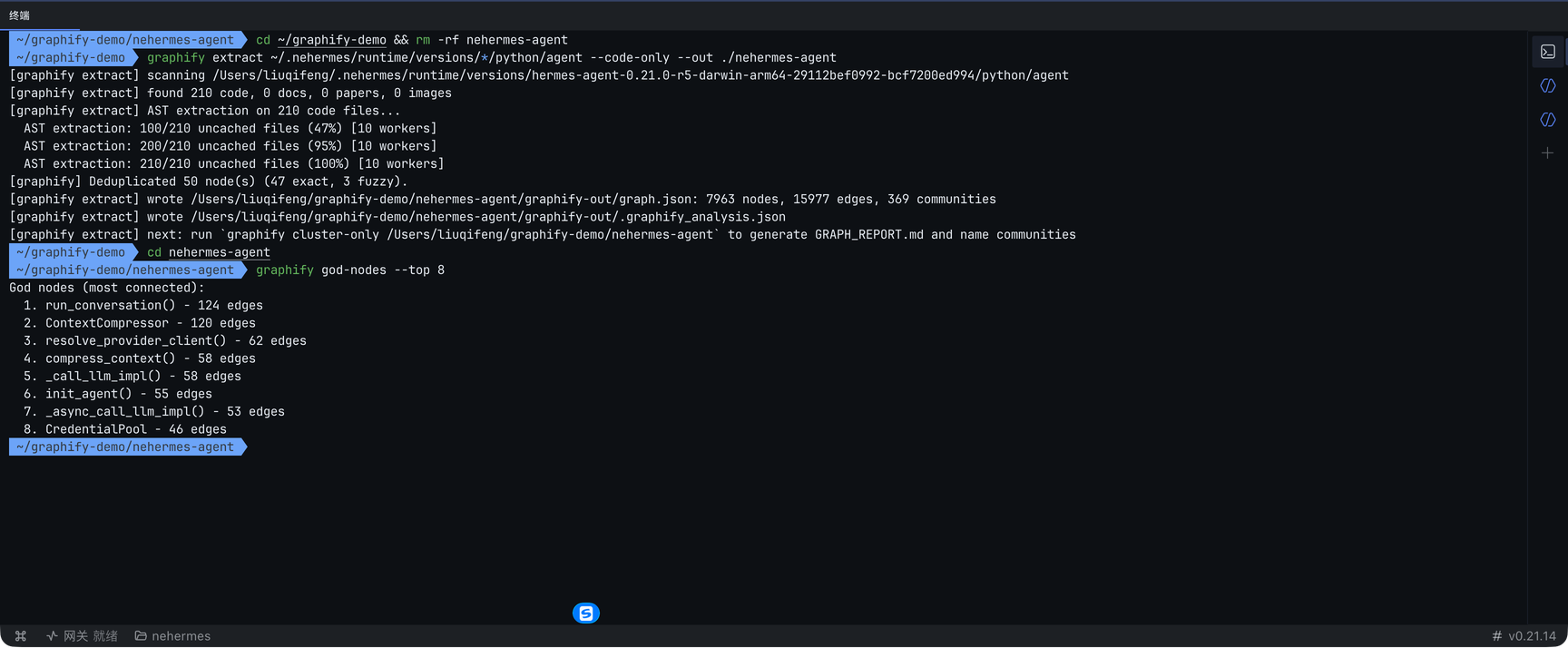
执行过程如图(注意 rm -rf 那行是为了排除缓存、走一次全新的抽取):

03-build-terminal.png

实测结果(真实数字)

  • 抽取到 210 个代码文件,10 个 worker 并发做 AST 解析,约 6.6 秒完成。
  • 图谱规模:7963 节点 · 15977 边 · 369 个社区;其中 92% 是 EXTRACTED(直接读出来的),8% 是 INFERRED(推断的)。
  • 产物大小:graph.json 8.7 MB、GRAPH_REPORT.md 135 KB、graph.html 524 KB。


核心节点(god nodes)

一张表就看清了这个 Agent 的骨架:

  1. 1. run_conversation()          124 edges
  2. 2. ContextCompressor           120
  3. 3. resolve_provider_client()    62
  4. 4. compress_context()           58
  5. 5. _call_llm_impl()             58
  6. 6. init_agent()                 55
  7. 7. _async_call_llm_impl()       53
  8. 8. CredentialPool               46
复制代码


自然语言查询也确实能用

  1. $ graphify query "how does the agent loop dispatch tool calls" --budget 300
  2. Graph: graphify-out/graph.json (7963 nodes) | Traversal: BFS depth=2 | 7 nodes found

  3. NODE agent [community=Community 258]
  4. NODE tool_executor.py [src=tool_executor.py loc=L1 community=Community 16]
  5. NODE ._dispatch() [src=monitoring/emitter.py loc=L109 community=Community 83]
  6. NODE LoopCapConfig [src=tool_guardrails.py loc=L185 community=Community 55]
  7. EDGE ._run() --calls [EXTRACTED context=call]--> ._dispatch() at=monitoring/emitter.py:L104
复制代码


最后,用 App 的预览面板看图

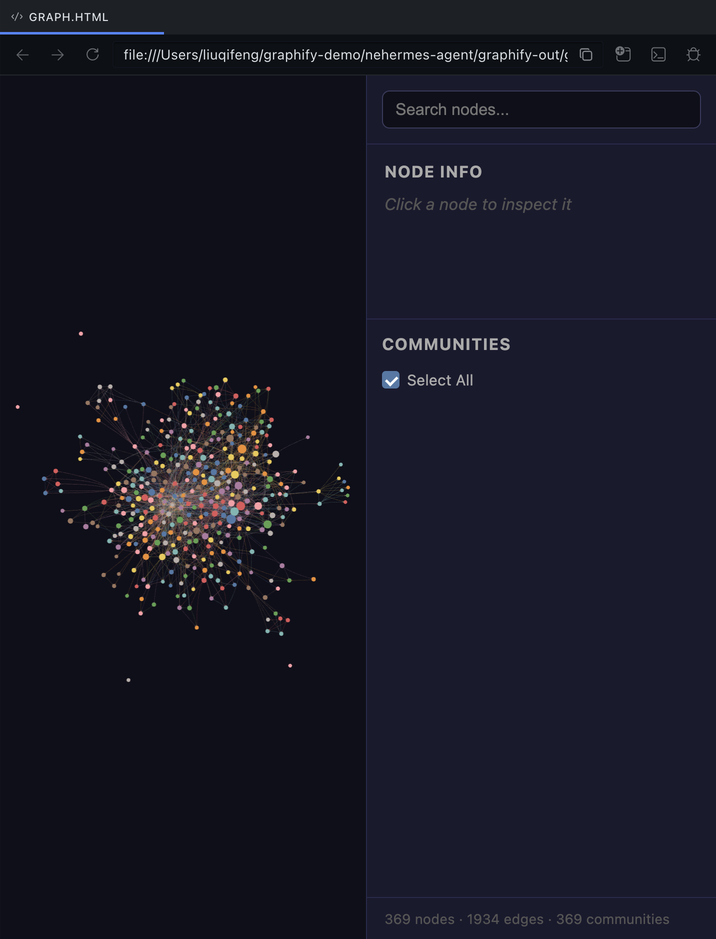
把 graphify-out/graph.html 丢进 NEHermes 的预览面板即可——搜索节点、点开看 NODE INFO 里的邻居、按 COMMUNITIES 过滤,全程不用写一行代码:

04-graph-preview.png

五、小结

  • 装:uv tool install graphifyy + graphify install --platform hermes,两条命令,注意在系统终端里执行。
  • 用:命令行三步走,或者直接跟 Agent 说一句话。
  • 值:210 个文件几秒出图,7963 个节点全部可查;查询、邻居解释、最短路径都不需要读源码。
  • 适合:接手陌生项目、改动前评估影响、给大仓库做结构索引。


回复

使用道具 举报

*滑块验证:
您需要登录后才可以回帖 登录 | 立即注册

本版积分规则

手机版|小黑屋|NoteExpress

GMT+8, 2026-10-16 23:47 , Processed in 0.056891 second(s), 32 queries .

Powered by Discuz! X5.0

© 2001-2026 Discuz! Team.

快速回复 返回顶部 返回列表